
Search

NEW

Electron Config Generator Python App

Electron Config Generator

GitHub Repository

Author: Arvin Javaheripur
Created: November 9th, 2023
License: GNU Lesser General Public License v3.0


Overview

The Electron Config Generator is a lightweight GUI-based Python application that calculates the full electron configuration of chemical elements and visualizes their Bohr models. This tool is useful for chemistry students and teachers who want to quickly determine electron configurations of elements and their atomic structures.


Features

  • Calculates electron configurations for elements up to atomic number 118.
  • Handles some orbital filling exceptions.
  • Displays the Bohr model of atoms.
  • Interactive GUI using PySimpleGUI.

Screenshot
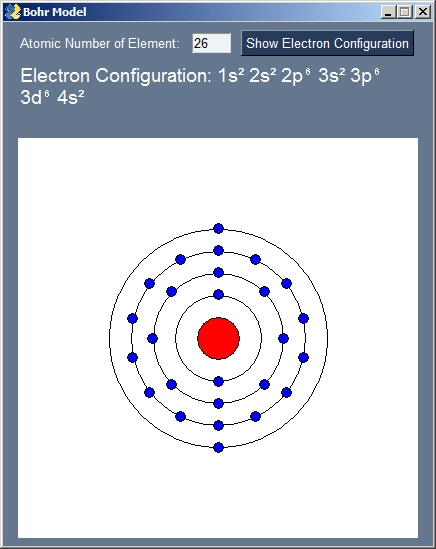
Electron Configuration Output

Output for atomic number 26 (Fe)


How it Works

  1. Enter the atomic number of the element.
  2. Click Show Electron Configuration.
  3. The application calculates the electron configuration using the standard orbital filling rules.
  4. A Bohr model is drawn with a big red circle representing the nucleus and electrons represented as small blue circles.

Note

This code may not always output the correct electron configuration due to orbital fulling exceptions.


Code Explanation

Below I go though the Python code step by step, with comments explaining each part.


1. Electron Configuration Calculation

1
2
3
4
5
6
7
8
9
10
11
12
13
14
15
16
17
18
19
20
21
22
23
24
25
26
27
28
29
30
def electron_configuration(electron_num):
"""
Determines the electron configuration for a given atomic number.
Uses standard orbital filling order and handles some exceptions.
"""
# Define the order in which orbitals fill
filling_order = ["1s", "2s", "2p", "3s", "3p", "4s", "3d", "4p",
"5s", "4d", "5p", "6s", "4f", "5d", "6p", "7s",
"5f", "6d", "7p", "8s"]

configuration = [] # Store the final configuration here
remaining_electrons = electron_num # Track electrons left to assign
i = 0 # Index in filling_order

while remaining_electrons > 0: # Repeat until we run out of electrons
subshell = filling_order[i][1] # 's', 'p', 'd', or 'f'
# Maximum electrons allowed in this subshell
shell_capacity = {"s": 2, "p": 6, "d": 10, "f": 14}[subshell]
# Find how many electrons can be placed in the orbital
electrons_in_subshell = min(shell_capacity, remaining_electrons)

# Append orbital and electron count to configuration
configuration.append(filling_order[i] + str(electrons_in_subshell))
# Subtract placed electrons from remaining
remaining_electrons -= electrons_in_subshell
i += 1 # Move to next orbital in filling order

# Sort orbitals to show them in increasing shell order
configuration.sort()
return configuration

2. Superscript Conversion and Input Validation

1
2
3
4
5
6
def convert_superscript(number):
"""
Converts a number into Unicode superscript.
Example: 2 to '²'
"""
return "¹²³⁴⁵⁶⁷⁸⁹⁰"["1234567890".find(str(number))]
  • Used for superscript notation like 1s². Just for aesthetic purposes.
1
2
3
4
5
6
7
8
9
10
11
12
13
14
15
def integer_test(string):
"""
Returns True if string contains only digits.
"""
for char in string:
if char not in "0123456789":
return False
return True


def remove_letters(string):
"""
Remove all non-numeric characters from input.
"""
return "".join([c for c in string if c in "0123456789"])
  • Used to validate input from the text box to avoid errors and safely reject bad input (for example, “abc” won’t be accepted).

3. Drawing the Bohr Model

1
2
3
4
5
6
7
8
9
10
11
12
13
14
15
16
17
18
19
20
21
22
23
24
25
26
27
28
29
30
31
32
33
34
35
36
37
38
39
40
41
42
43
44
45
46
47
48
49
50
51
def draw_bohr_model():
GRAPH_SIZE = (400, 400)

# Define PySimpleGUI layout. This is used to tell PySimpleGUI what elemets to put on the screen.
layout = [
[sg.Text("Atomic Number of Element:"),
sg.Input("", size=(5,20), key="inp"),
sg.Button("Show Electron Configuration", bind_return_key=True, key="start")],
[sg.Text("Electron Configuration:\n\n", font=("Helvetica", 14), key="config")],
[sg.Graph(canvas_size=GRAPH_SIZE,
graph_bottom_left=(0,0),
graph_top_right=(GRAPH_SIZE[0]+150, GRAPH_SIZE[1]+150),
background_color="white",
key="GRAPH")]
]

# Create window
window = sg.Window("Bohr Model", layout, finalize=True)
graph = window["GRAPH"]

while True:
event, values = window.read()
if event == sg.WIN_CLOSED: # Close window on user's request
break

inp = values["inp"]
# Only accept numeric inputs 1-118
if event == "start" and inp.isdigit() and 1 <= int(inp) <= 118:
configuration = electron_configuration(int(inp))
graph.erase() # Clear previous drawings

# Draw nucleus in the center
graph.draw_circle((275, 275), 30, fill_color="red")

# Draw electrons
prev_shell = 1
electrons_num = 0
for orbital in configuration:
shell = int(orbital[0])
if shell != prev_shell:
# Draw shell circle/ring
angle_increment = 2 * pi / electrons_num
graph.draw_circle((275, 275), (prev_shell+1)*30)
# Space electrons out evenly and droaw them
for j in range(electrons_num):
x = cos(angle_increment*j - pi/2)*(prev_shell+1)*30 + 275
y = sin(angle_increment*j - pi/2)*(prev_shell+1)*30 + 275
graph.draw_circle((x, y), 7, fill_color="blue")
prev_shell = shell
electrons_num = 0
electrons_num += int(orbital[2:])
  • Uses PySimpleGUI Graph to render Bohr model.
  • Nucleus = red circle.
  • Electron shells = unfilled circles.
  • Electrons = blue circles evenly spaced using cos/sin.

Installation

Want to try it out? Run these commands:

1
2
3
4
git clone https://github.com/ajavaheripur/Electron-Config-Generator.git
cd Electron-Config-Generator
pip install -r requirements.txt
python electron_config_gui.py

Requirements:


Check out the project on GitHub for updates.